
Introduction to Fortect

Fortect is a cybersecurity and system protection brand focused on keeping devices secure, private, and running smoothly across multiple platforms. Rather than offering a single utility, Fortect provides a suite of products designed to protect Windows PCs, Mac computers, mobile devices, browsers, and internet connections.
At its core, the brand combines security, repair, and privacy tools into practical solutions for everyday users. Whether someone is trying to remove malware from a laptop, protect their Mac in real time, secure public Wi-Fi with a VPN, or prevent phishing attacks in a browser, Fortect positions itself as an accessible, all-in-one protection ecosystem.
Unlike many brands that focus strictly on antivirus detection, Fortect expands into broader protection categories:
- System repair and performance optimization
- Real-time antivirus and malware protection
- VPN-based online privacy
- Browser-level threat prevention
- Mobile device security
This multi-product approach makes Fortect suitable for individuals who want consistent protection across all their devices rather than relying on separate vendors for each need.
A Brand Built Around Full Protection
Fortect’s product lineup includes:
- Fortect PC Suite
- Fortect Mac Suite
- Fortect VPN
- Fortect Browsing Protection Extension
- Fortect Mobile Security
Each product is available as a full paid version, with free scans or limited previews offered so users can evaluate the software before upgrading. While those free scans help identify issues, the full versions unlock complete protection, real-time monitoring, repair capabilities, and advanced features.
The emphasis of this page is on the complete, paid solutions, since that’s where the real value lies. The free tools primarily serve as diagnostics or limited-function previews, while the premium versions provide continuous protection and active threat management.
Designed for Everyday Users
Fortect is built for people who want protection without needing technical expertise. The software interfaces are straightforward. Scans are automated. Threat alerts are clearly explained. Repairs and removals are handled in guided steps rather than complex manual commands.
This makes the brand particularly relevant for:
- Home users managing personal laptops and phones
- Remote workers handling sensitive information
- Families sharing multiple devices
- Users who want both performance improvement and security in one place
At the same time, Fortect covers more than just virus removal. Its Windows solution, for example, blends repair and malware protection. Its Mac solution focuses on dedicated antivirus defense for macOS. Its VPN adds encrypted browsing. Its browser extension helps stop phishing attempts before they load. And its mobile app brings protection to smartphones, where threats are increasingly common.
A Cross-Platform Protection Ecosystem
Many users today operate across multiple systems: Windows at work, a Mac at home, an Android or iPhone on the go, and multiple browsers throughout the day. Fortect addresses this reality by building products that can work individually or together.
Instead of being limited to a single operating system, Fortect functions as a broader device security brand. The goal is consistent protection, privacy, and performance regardless of platform.
In the sections that follow, we’ll explore each Fortect product in detail, how they work, what features they include, how pricing is structured, and who they are best suited for.
Fortect Product Line Overview
Fortect is not a single software product. It is a multi-solution security and repair brand that covers desktops, mobile devices, and browser environments. Each product is designed to solve a specific problem, but together they form a broader protection ecosystem.
All Fortect products are unlocked through one of three subscription plans (Essential, Multi-Device, or Ultimate), with the only difference being the number of devices covered — not the features included. The full subscription starting price is $69.95 for a year. Fortect often runs promos like 50% off.
Below is a structured overview of Fortect’s main products, with a focus on their full, paid functionality.
Fortect PC Suite
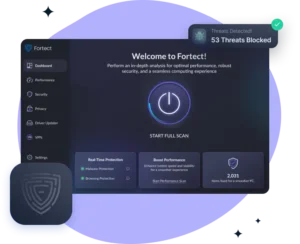
Fortect PC Suite is the brand’s most comprehensive desktop solution for Microsoft Windows systems. It combines real-time malware protection, performance optimization, and system repair capabilities within one platform.
Unlike traditional antivirus programs that focus only on detecting and removing threats, this product also works at the operating system level. It scans for:
- Malware and active threats
- Corrupted system files
- Performance bottlenecks
- Security vulnerabilities
- Privacy-related risks
The full version enables real-time protection, continuous monitoring, and automated repair tools that help maintain long-term system stability. While a free scan is available to identify issues, the paid version unlocks full removal, repair, and protection capabilities.
This product is best suited for users who want both security and performance improvement in one solution rather than installing separate tools.
Fortect Mac Suite
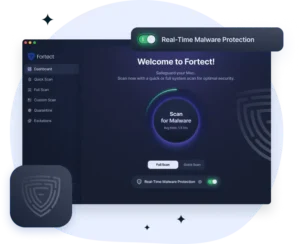
Fortect Mac Suite is an antivirus designed specifically for macOS devices. While Macs are often perceived as more secure than Windows systems, they are not immune to malware, adware, phishing attacks, or data theft.
The paid version of Fortect Mac Suite provides:
- Real-time malware protection
- Cloud-assisted threat detection
- On-demand scanning (quick and full system scans)
- Removal of malicious software
- Continuous monitoring for suspicious activity
Its primary focus is security rather than system repair. The software works as a dedicated antivirus for Mac users who want an added layer of protection beyond Apple’s built-in safeguards.
A limited free scan may be available for threat detection, but full removal and continuous protection require the paid plan.
Fortect VPN (Windows Only)
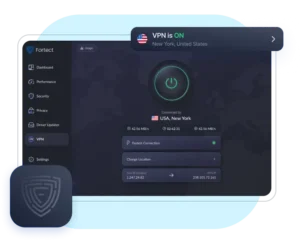
Fortect VPN is currently available for Windows systems, with cross-platform support for macOS, iOS, and Android listed as coming soon. The product requires an active Fortect PC Suite plan, as it comes as an add-on service.
This product focuses on online privacy and encrypted browsing. It protects users by:
- Encrypting internet traffic
- Masking the user’s IP address
- Securing data on public Wi-Fi networks
- Reducing tracking by third parties
The paid version grants access to the full VPN network, server selection options, and continuous encrypted connectivity. It is intended for users who prioritize privacy, especially when using unsecured networks such as cafés, airports, or hotels.
Unlike the antivirus and repair products, Fortect VPN is dedicated specifically to privacy and connection security rather than malware removal.
Fortect Browsing Protection Extension
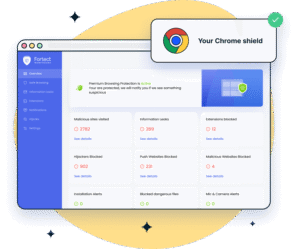
Fortect Browsing Protection is a free Chrome browser extension built to enhance web safety. It acts as a real-time filter between the user and potentially harmful websites.
The full version provides:
- Phishing site detection
- Malicious website blocking
- Threat warnings before unsafe pages load
- Real-time browsing protection
Rather than scanning an entire device, this product focuses specifically on browser-level risks. It is particularly useful for users who frequently shop online, access email through a browser, or handle sensitive information on web platforms.
The extension works alongside antivirus software and adds an additional defensive layer directly within the Chrome browsing environment.
Fortect Mobile Security

Fortect Mobile Security is designed for smartphones and tablets, supporting both Android and iOS devices (with platform-specific feature variations). Active Fortect subscription is needed.
The paid version includes:
- Real-time mobile threat protection
- Web protection against phishing sites
- Unsafe Wi-Fi network detection
- Data breach alerts
- App-level security monitoring
Mobile devices often store personal emails, banking apps, passwords, and sensitive photos. This product focuses on protecting those assets through continuous monitoring and proactive alerts.
As with other Fortect products, a free scan or limited preview may be available, but advanced protection and continuous monitoring are unlocked in the full version.
How the Products Work Together
While each Fortect product can be used independently, they are designed to complement one another.
For example:
- A Windows user could combine Fortect PC Suite with Fortect VPN for both malware protection and encrypted browsing.
- A Mac user could pair Fortect Mac Suite with the Browsing Protection Extension for layered defense.
- A mobile user could use Mobile Security to protect against phishing attempts that originate from email or messaging apps.
The result is a flexible ecosystem where users can select the tools they need instead of committing to a rigid, bundled suite.
In the next section, we’ll explore Fortect’s core technology and approach to device security in more detail.
Core Features and Capabilities
Fortect builds its reputation around practical protection. Instead of adding flashy extras, the brand focuses on tools that solve common problems: malware infections, unsafe browsing, privacy risks, unstable systems, and performance slowdowns.
Below is a breakdown of the main capabilities across the Fortect product line.
Real-Time Threat Protection
Real-time protection sits at the center of Fortect’s security products. The PC Suite, Mac Suite, and Mobile Security solutions actively monitor devices instead of relying only on manual scans.
When enabled, the software:
- Scans files as they open or download
- Blocks malicious programs before they execute
- Monitors suspicious behavior in the background
- Detects phishing attempts and unsafe websites
This proactive model reduces the chance of infection. Instead of cleaning up damage after the fact, Fortect aims to stop threats at the entry point.
Cloud-assisted detection strengthens this system. The software checks suspicious files against updated threat intelligence databases, which helps it identify newer malware variants more quickly.
Malware Detection and Removal
Fortect’s paid products allow full malware removal, not just detection. Once the system flags a threat, users can quarantine or eliminate it directly from the dashboard.
Threat categories typically include:
- Viruses
- Trojans
- Spyware
- Adware
- Potentially unwanted programs (PUPs)
- Phishing-related scripts
The interface presents findings clearly. Instead of overwhelming users with technical logs, it organizes results by severity and risk level. This makes the cleanup process easier for non-technical users.
While free scans may show detected threats, the paid version unlocks complete removal and ongoing protection.
System Repair and Performance Optimization (Windows Focus)
Fortect PC Suite goes beyond antivirus. It also addresses system stability and performance issues that slow down PCs over time.
The software scans for:
- Corrupted system files
- Registry irregularities
- Performance bottlenecks
- Security vulnerabilities
- Privacy traces
After analysis, users can initiate automated repair. The tool replaces damaged system components and resolves underlying issues that cause crashes or instability.
This dual approach, combining security with repair, distinguishes the Windows product from traditional antivirus tools. It targets both infection and structural system damage in one workflow.
VPN-Based Online Privacy (Windows)
Fortect VPN, currently available for Windows, protects internet traffic through encrypted connections. Once activated, it routes user data through secure servers and hides the device’s IP address.
Key privacy benefits include:
- Encrypted data transmission
- Protection on public Wi-Fi networks
- Reduced exposure to tracking
- Masked browsing location
The VPN operates independently from antivirus protection. Users who prioritize online anonymity or frequently connect to unsecured networks may find this feature especially valuable.
Cross-platform support for macOS, iOS, and Android is listed as coming soon, but at present the service focuses on Windows systems.
Browser-Level Protection
The Fortect Browsing Protection Extension adds a direct safety layer inside the browser. Instead of scanning the entire device, it focuses specifically on web-based threats.
It works by:
- Warning users before they visit malicious websites
- Blocking known phishing pages
- Preventing harmful downloads
- Alerting users about suspicious links
Because many modern threats originate from phishing emails or compromised websites, this layer reduces risk at the browsing level. It works alongside desktop antivirus rather than replacing it.
Mobile Security and Network Monitoring
Fortect Mobile Security extends protection to smartphones and tablets. Mobile devices now store banking apps, personal emails, and authentication credentials, which makes them attractive targets.
The mobile solution includes:
- Real-time app monitoring
- Web protection against phishing links
- Unsafe Wi-Fi detection
- Data breach alerts
- Threat scanning
Instead of treating mobile security as secondary, Fortect positions it as part of a broader device protection strategy.
Cloud-Assisted Security Infrastructure
Across its products, Fortect integrates cloud-based threat intelligence. This system allows the software to compare suspicious activity against a broader database rather than relying solely on local definitions.
Cloud integration supports:
- Faster detection of emerging threats
- Continuous database updates
- Reduced dependency on manual updates
- Broader threat coverage
This approach helps the software stay responsive to evolving risks without requiring constant user intervention.
User-Friendly Dashboard and Automation
Fortect designs its interface for clarity. Users see categorized results instead of raw technical output. The dashboard typically highlights:
- Security status
- Detected threats
- Performance issues
- Recommended actions
Most repairs and removals happen in a few clicks. Users do not need to navigate system folders, edit registry entries, or run command-line tools.
Automation plays a major role. Scheduled scans, real-time monitoring, and instant alerts reduce the need for constant manual checks.
A Unified Security Approach
While each Fortect product serves a specific function, the overall feature set reflects a broader philosophy: layered protection.
- Antivirus stops malicious files.
- System repair restores stability.
- VPN encrypts internet traffic.
- Browser protection blocks unsafe websites.
- Mobile security protects smartphones.
Instead of depending on a single defense line, Fortect encourages users to combine tools based on their needs.
In the next section, we’ll examine how Fortect works in practice, from installation to everyday use.

How Fortect Works
Fortect designs its products to be straightforward from installation to daily use. While each solution targets a different platform or threat type, the overall workflow follows a similar pattern: install, scan, review results, activate full protection, and maintain ongoing monitoring.
Below is a practical look at how Fortect works across its core products.
Installation and Setup
Fortect keeps the installation process simple. Users download the installer directly from the official website, run the setup file, and follow guided prompts. The process usually takes only a few minutes.
Once installed, the software launches automatically and prompts the user to begin an initial scan. This first scan serves two purposes:
- It gives the user a snapshot of their device’s current condition.
- It demonstrates how the software identifies risks and system issues.
For paid users, activation typically requires entering a license key or logging into a registered account. After activation, real-time protection and advanced features become fully accessible.
The VPN setup follows a similar structure on Windows. After installation, users log in, choose a server location, and activate the encrypted connection with a single click.
Each Fortect product performs a targeted scan based on its function:
- PC Suite checks for malware, corrupted system files, performance issues, and privacy risks.
- Mac Suite scans for malicious files and suspicious applications.
- Mobile Security examines apps, web activity, and network connections.
- Browsing Protection monitors URLs in real time rather than running a traditional system scan.
- Fortect VPN does not scan the system but secures the connection once activated.
The scan process generally runs automatically in the background. Users can continue using their device while the scan completes.
Results appear in organized categories such as security risks, performance issues, or privacy concerns. Instead of presenting technical logs, Fortect summarizes findings clearly so users can understand what needs attention.
Review and Action
After the scan completes, Fortect presents a structured report. The report typically shows:
- Number of threats detected
- Severity levels
- System or app issues
- Recommended actions
Free scans may display findings but limit full remediation. Paid users can proceed directly to removal or repair.
With one click, users can:
- Remove malware
- Repair damaged Windows files
- Clear identified vulnerabilities
- Resolve performance bottlenecks
- Activate protection features
The system handles the technical steps automatically. Users do not need to manually locate infected files or edit system settings.
Real-Time Protection and Monitoring
Once activated, Fortect moves from reactive scanning to active monitoring.
Real-time protection:
- Scans new files as they download
- Monitors system behavior
- Blocks suspicious activity instantly
- Prevents unsafe websites from loading
On mobile devices, the software also watches for unsafe Wi-Fi networks and alerts users when they connect to potentially risky connections.
The browsing extension works continuously in the background. It checks websites against threat databases before they fully load and warns users if it detects phishing or malicious content.
For VPN users, the protection activates when the encrypted tunnel connects. All outgoing and incoming internet traffic routes through the secure server until the user disconnects.
Cloud Integration and Updates
Fortect integrates cloud-based threat intelligence into its security framework. When the software encounters a suspicious file or website, it can check that item against updated threat databases.
This system allows Fortect to:
- Identify emerging threats quickly
- Update detection capabilities automatically
- Reduce reliance on manual updates
- Improve response time to new malware strains
Users do not need to download daily definition files manually. The software manages updates in the background to maintain protection.
Ongoing Maintenance
Security is not a one-time task. Fortect encourages consistent maintenance through:
- Scheduled scans
- Continuous background monitoring
- Automatic updates
- Instant threat notifications
Users can adjust scan frequency and notification settings based on their preferences. Some prefer daily scans. Others rely primarily on real-time monitoring.
For Windows users, ongoing maintenance may also include performance monitoring and system health checks, helping maintain stability beyond basic malware protection.
A Practical, User-Focused Workflow
Fortect structures its products around simplicity. Install the software, run an initial scan, review the findings, activate the full version, and let real-time protection handle ongoing security.
The system avoids unnecessary technical complexity. It presents clear recommendations and automates repair or removal processes wherever possible.
In the next section, we’ll examine pricing structure, licensing options, and what users receive with the full paid versions of each Fortect product.
Pricing, Licensing, and Plans
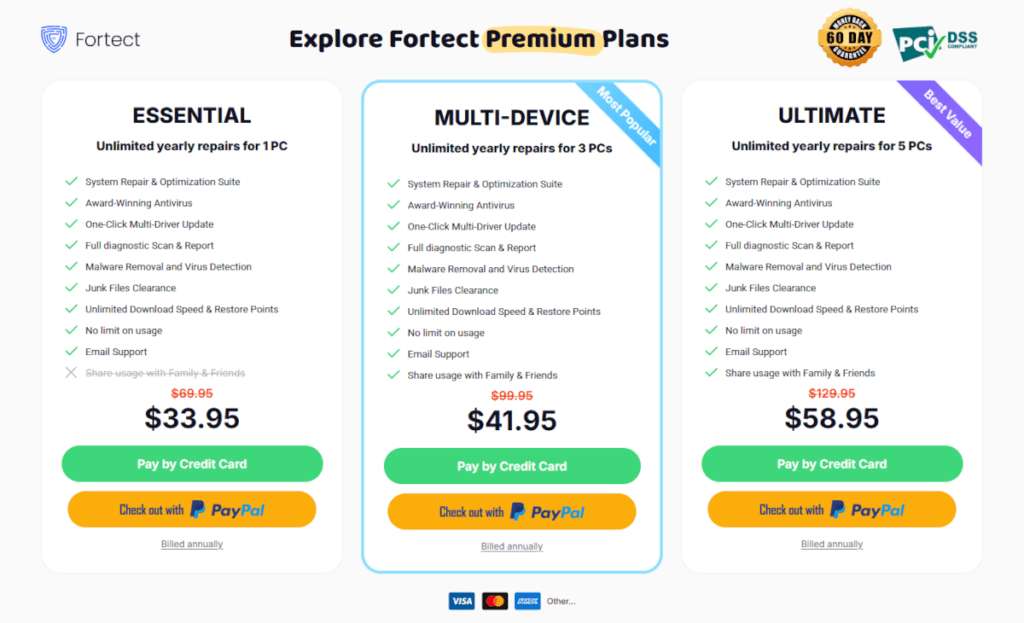
Fortect uses a subscription-based pricing model that unlocks full protection, repair tools, and optimization features across its products. Instead of separate prices for each product, users choose one of three premium plans that determine how many devices they can protect and repair. All plans cover the full suite of Fortect’s core tools (Windows PC Suite, Mac Antivirus Suite, Mobile Security, and more) except the free Browsing Protection Extension for Chrome, which works independently.
Fortect charges an annual fee for its premium plans and includes a 60-day money-back guarantee for users who choose to cancel soon after purchase.
Fortect Premium Plan Comparison
Fortect currently offers three main subscription plans. Each plan includes the same core features — system repair, malware protection, optimization, virus detection, and email support — with the primary difference being how many devices you can protect:
| Plan | Devices Covered | Typical Features Included |
|---|---|---|
| Essential | 1 device | System repair & optimization, award-winning antivirus, malware removal, junk clearance, diagnostic scans, unlimited usage, shared access |
| Multi-Device | 3 devices | Same features as Essential, for up to 3 devices |
| Ultimate | 5 devices | Same features as Essential, for up to 5 devices |
All plans include features like full diagnostic scans, malware and virus removal, one-click multi-driver updates, unlimited restore points, and performance cleanup tools.
Example pricing (billed annually):
- Essential — $33.95/year for 1 device*
- Multi-Device — $41.95/year for 3 devices*
- Ultimate — $58.95/year for 5 devices*
(*Pricing may vary based on promotions or regional pricing. The prices listed are in USD with the 50% discount.)
What the Plans Include
Each premium subscription unlocks the same set of core features — just for a different number of devices:
- Real-time protection and malware removal across supported devices
- System repair and optimization for Windows and macOS (depending on device)
- Driver updates and performance tuning
- Unlimited usage and scans throughout the subscription period
- Email support and 60-day money-back guarantee
The Browsing Protection Extension for Chrome remains available even without a premium subscription, but full, ongoing protection across devices requires an active premium plan.
Subscription Terms and Value
Fortect plans renew automatically at the end of each billing period unless canceled. Users receive a reminder before renewal, and the 60-day money-back guarantee gives leeway to test the service risk-free.
This pricing structure suits users who want consistent, ongoing protection rather than a one-time fix. Because subscription plans allow unlimited scans and repairs within each year, upgrades are not required after initial activation.
Choosing the Right Plan
Here’s how to think about plan selection:
- Essential — Best for one user who needs full protection on a single device.
- Multi-Device — Ideal for small households or users with more than one device.
- Ultimate — Excellent for families or individuals managing multiple laptops, desktops, and devices.
Because all plans include the same feature set, the real decision comes down to how many devices you plan to protect with Fortect tools.
Here’s a clean pricing comparison table:
Fortect Pricing Plans Comparison
| Feature / Plan | Essential | Multi-Device | Ultimate |
|---|---|---|---|
| Devices Covered | 1 Device | 3 Devices | 5 Devices |
| Fortect PC Suite | ✔ Included | ✔ Included | ✔ Included |
| Fortect Mac Suite | ✔ Included | ✔ Included | ✔ Included |
| Mobile Security | ✔ Included | ✔ Included | ✔ Included |
| Fortect VPN (Windows) | ✔ Included | ✔ Included | ✔ Included |
| Real-Time Protection | ✔ | ✔ | ✔ |
| Malware Removal | ✔ | ✔ | ✔ |
| System Repair (Windows) | ✔ | ✔ | ✔ |
| Performance Optimization | ✔ | ✔ | ✔ |
| Unlimited Scans | ✔ | ✔ | ✔ |
| 60-Day Money-Back Guarantee | ✔ | ✔ | ✔ |
| Browsing Protection for Chrome | Free (separate) | Free (separate) | Free (separate) |
Key Difference: The only difference between plans is the number of devices covered. All premium features remain the same across all three plans.
Why All Plans Include the Same Features
Fortect simplifies security. Instead of restricting features by tier, every subscription unlocks the complete protection suite. The only difference is device coverage. This means you don’t have to upgrade just to access stronger protection — you upgrade only if you need to protect more devices.
Installation & Setup Process
Fortect designs its products for quick setup and minimal friction. Most users can install and activate protection in just a few minutes without technical experience. The process remains consistent across the product line, with small differences depending on the platform.
Below is a step-by-step overview of how installation and setup typically work.
Downloading the Software
Users begin by visiting the official Fortect website and selecting their product:
- Fortect PC Suite
- Fortect Mac Suite
- Fortect VPN (Windows)
- Browsing Protection Extension
- Mobile Security
After choosing a product, they download the installer file (for desktop software) or install directly from the relevant app store (for mobile). The browser extension installs through the Chrome Web Store or compatible browser marketplace.
Downloads are lightweight and begin immediately. No complex configuration is required before installation.
Installing on Windows (PC Repair & VPN)
For Windows-based products:
- Run the downloaded installer file.
- Accept the license agreement.
- Follow the on-screen prompts.
- Complete installation.
The software launches automatically once installed.
For Fortect PC Suite, the system usually initiates a first scan right away. This gives users a baseline report of security, performance, and system health.
For Fortect VPN, users log in, choose a server location, and activate the encrypted connection with one click.
Activation of the paid version requires entering a license key or signing into the account used for purchase. Once activated, real-time protection and advanced features switch on immediately.
Installing on macOS (Mac Suite)
Mac users follow a similar process:
- Download the installer package.
- Open the file and drag the application into the Applications folder (if required).
- Grant necessary system permissions.
macOS may request security approvals, such as allowing system monitoring or granting disk access. These permissions enable real-time protection to function properly.
After setup, the software runs an initial scan. Users can then activate their paid license to enable continuous protection.
Installing the Browsing Protection Extension
The browsing extension installs directly inside the browser.
- Open the extension page.
- Click “Add to Browser.”
- Confirm installation.
Once added, the extension activates automatically. It begins checking websites in real time without requiring a full device scan.
Users may log into their Fortect account to unlock premium protection features, depending on the licensing structure.
Installing Mobile Security
For mobile devices:
- Download the Fortect Mobile Security app from the App Store or Google Play.
- Open the app.
- Grant requested permissions (network access, notifications, app monitoring).
- Sign in or activate the paid subscription.
After setup, the app runs an initial device check and begins continuous monitoring.
Mobile operating systems often limit deep system access, so some features vary depending on whether the device runs Android or iOS. Still, setup remains straightforward.
First Scan and Initial Configuration
Once installed, Fortect products typically guide users through:
- Running the first scan
- Reviewing detected issues
- Adjusting notification settings
- Setting up scheduled scans
- Enabling real-time protection
The dashboard highlights device status clearly. Users can choose automatic or manual scan scheduling based on preference.
For VPN users, configuration may include selecting a default server or enabling auto-connect on startup.
Ease of Use and User Interface
Fortect keeps its interface clean and structured. The main dashboard usually shows:
- Protection status
- Last scan results
- Active features
- Quick action buttons
Navigation stays simple. Users do not need to search through layered menus to find core features.
The software avoids technical jargon where possible. It categorizes issues in practical terms such as “security risk,” “performance issue,” or “privacy concern.”
Overall Setup Experience
From download to active protection, Fortect emphasizes speed and clarity. Most users can:
- Install the software in minutes
- Run an initial scan immediately
- Activate full protection with minimal steps
- Begin real-time monitoring right away
This streamlined installation process supports Fortect’s broader goal: making device protection accessible without requiring advanced technical knowledge.
In the next section, we’ll examine how Fortect impacts system performance during everyday use.
Performance Impact
Security software should protect your device without slowing it down. Fortect designs its products to run efficiently in the background while keeping system resources under control. Still, any software that scans files or monitors activity will use some CPU and memory. The key question is how noticeable that impact becomes during daily use.
Below is a practical look at how Fortect affects performance across its main products.
Resource Usage During Scans
When running a full system scan, Fortect temporarily increases CPU and disk activity. This applies to:
- Fortect PC Suite
- Fortect Mac Suite
- Mobile Security (where supported)
During a full scan, users may notice:
- Slightly slower application launches
- Increased fan activity on laptops
- Higher CPU usage in Task Manager or Activity Monitor
This behavior is normal for security software. Once the scan completes, resource usage returns to baseline levels.
Quick scans typically consume fewer resources and finish faster. Users who want minimal interruption can schedule scans during off-hours, such as overnight.
Real-Time Protection Overhead
Real-time protection monitors files as they open, download, or execute. Fortect optimizes this process to avoid constant heavy scanning.
In everyday use, real-time monitoring:
- Runs quietly in the background
- Uses moderate memory allocation
- Triggers deeper scanning only when necessary
Most users should not notice a measurable slowdown during routine tasks like browsing, streaming, or working in office applications.
On older or low-RAM systems, some minor performance impact may occur during active threat detection. However, modern systems typically handle background monitoring without issue.
Windows System Repair and Optimization Effects
Fortect PC Suite can actually improve performance after completing repairs. If the software identifies corrupted files, startup issues, or registry irregularities, fixing them may result in:
- Faster boot times
- Fewer crashes
- Reduced system freezes
- More stable application performance
The performance gain depends on the condition of the system before repair. A healthy PC may show little change. A heavily cluttered or damaged system may show noticeable improvement.
It’s important to note that optimization features do not replace hardware upgrades. Fortect cannot compensate for outdated processors or insufficient RAM. It can, however, help remove software-level bottlenecks.
VPN Speed and Connection Stability (Windows)
Fortect VPN encrypts internet traffic, which can slightly reduce connection speed. This happens with all VPN services due to encryption overhead and server routing.
Users may experience:
- Slightly lower download speeds
- Minor increases in latency
- Stable but slightly reduced streaming performance
Speed differences depend on:
- Distance to the selected server
- Local internet connection quality
- Network congestion
In most cases, everyday browsing and streaming remain smooth. Users who require maximum speed for gaming or large file transfers can disconnect the VPN when encryption is not needed.
Browser Extension Impact
The Browsing Protection Extension checks websites in real time. Because it focuses only on URL filtering and threat detection, its impact on browser speed remains minimal.
Users should not experience noticeable delays when loading pages. The extension operates quietly unless it detects a threat and displays a warning.
Mobile Performance Considerations
On smartphones, Fortect Mobile Security runs within the limitations of the operating system.
It may:
- Use background battery power for monitoring
- Send notifications for network or app risks
- Perform periodic scans
Modern smartphones handle these tasks efficiently. Battery impact typically remains moderate, though continuous network monitoring can slightly increase background usage.
Users can adjust notification frequency and scanning schedules to balance protection with battery life.
Overall Performance Assessment
Fortect products aim to strike a balance between protection and efficiency.
- Full scans temporarily increase resource usage.
- Real-time monitoring stays lightweight in most cases.
- VPN encryption may reduce connection speed slightly.
- Repair tools can improve system stability on Windows PCs.
For most users with up-to-date devices, Fortect should not create significant slowdowns. Systems already struggling due to hardware limitations may notice more impact, but those same systems may also benefit the most from repair and optimization features.
In the next section, we’ll summarize the main advantages and limitations of the Fortect product lineup.
Pros and Cons
No security brand fits every user. Fortect offers a broad range of protection tools, but like any software ecosystem, it comes with both strengths and limitations. Below is a balanced overview based on its product structure and feature set.
Pros
Multi-Product Ecosystem
Fortect covers several areas of digital protection:
- Windows system repair and antivirus
- Mac antivirus
- VPN for encrypted browsing (Windows)
- Browser-level phishing protection
- Mobile security
Users can choose one product or combine multiple tools depending on their needs. This flexibility avoids forcing customers into oversized bundles.
Real-Time Protection Across Platforms
Windows, Mac, and mobile solutions include continuous monitoring. Instead of relying only on manual scans, Fortect actively watches for threats and blocks suspicious activity as it appears.
This reduces the risk of infections spreading before detection.
System Repair Capabilities on Windows
The PC Suite product stands out because it blends malware protection with system repair and performance tools. Many antivirus programs focus only on threat removal. Fortect also targets corrupted files, performance bottlenecks, and stability issues.
For users dealing with crashes or slowdowns, this dual approach can add value.
User-Friendly Interface
Fortect keeps navigation simple. Dashboards present findings clearly and group issues into understandable categories such as security risks or performance concerns.
Users do not need advanced technical knowledge to run scans or apply fixes.
Layered Protection Options
Fortect offers different protection layers:
- Antivirus defense
- VPN encryption
- Browser-level filtering
- Mobile network monitoring
This layered model supports users who want more than just basic malware scanning.
Unified Subscription Model
Fortect does not sell separate full licenses for each individual product. Instead, users choose one of three subscription plans — Essential, Multi-Device, or Ultimate — and that plan unlocks the complete feature set across supported Fortect products.
The difference between plans is the number of devices covered, not the features included. All paid plans provide access to full functionality for Fortect PC Suite, Mac Suite, Mobile Security, and other premium tools (with the exception of the standalone Browsing Protection for Chrome, which can operate independently).
This structure simplifies licensing. Rather than managing multiple product subscriptions, users select one plan based on how many devices they want to protect.
Cons
VPN Currently Limited to Windows
Fortect VPN currently supports Windows only, with cross-platform support listed as coming soon. Users on macOS, iOS, or Android who want VPN protection must wait for expanded compatibility.
Separate Subscriptions for Each Product
While flexibility can be an advantage, some users may prefer a single bundled plan instead of managing multiple subscriptions for different devices.
Free Versions Offer Limited Functionality
Free scans help users detect issues, but full removal, repair, and real-time monitoring require paid activation. Users looking for completely free long-term protection may find this limiting.
Performance Impact During Full Scans
Like all security software, Fortect increases CPU and disk activity during deep scans. On older devices, this may cause temporary slowdowns.
System Repair Focus Primarily on Windows
The advanced repair and optimization features apply mainly to the Fortect PC Suite product. Mac users receive strong antivirus protection but not the same level of system repair functionality.
Overall Strengths vs Limitations
Fortect performs best for users who want:
- Straightforward protection
- Clear scan results
- Repair options on Windows
- Layered security tools across devices
It may feel less appealing to:
- Users who prefer completely free tools
- Advanced IT professionals who prefer manual system management
- Those seeking a single bundled, cross-platform VPN today
In the next section, we’ll look at real-world usage scenarios and how different types of users might benefit from Fortect’s product lineup.
Real-World Use Cases
Security software only proves its value in real situations. Fortect’s products target everyday problems that many users face, from infected laptops to unsafe public Wi-Fi. Below are practical examples of how different people might use Fortect in daily life.
Fixing a Slowing Windows PC
A common scenario involves a Windows laptop that has become noticeably slower over time. Programs take longer to open. Startup feels delayed. Occasional error messages appear without clear cause.
With Fortect PC Suite, a user can:
- Run a full system scan
- Identify malware or unwanted programs
- Detect corrupted system files
- Review performance-related issues
After activating the full version, the user can remove threats and repair system-level problems in a structured way.
If the slowdown stems from software corruption or leftover malware damage, repair tools may restore stability and improve boot speed. While the software cannot upgrade hardware, it can resolve many software-related bottlenecks.
This use case fits home users who want to avoid a full system reset or professional repair service.
Recovering After a Malware Infection
Imagine a user who already ran antivirus software and removed a virus but still notices system instability. Applications crash. Windows behaves unpredictably.
In this case:
- The antivirus removes the active threat.
- Fortect PC Suite helps address any lingering system damage.
This layered approach separates threat removal from system restoration, which often solves post-infection performance issues.
Mac users can apply a similar approach with Fortect Mac Suite, especially if they suspect adware or malicious applications have infiltrated their system.
Securing Public Wi-Fi Connections
A remote worker frequently connects to public Wi-Fi in cafés or airports. These networks can expose unencrypted traffic to interception.
By activating Fortect VPN (Windows) before connecting, the user:
- Encrypts internet traffic
- Masks their IP address
- Reduces exposure to network-based attacks
This setup helps protect sensitive activities such as email access, document transfers, or online banking while on unsecured networks.
Avoiding Phishing Scams While Browsing
Phishing attempts often arrive through email links or search results. A user clicks a link that appears legitimate but leads to a fraudulent login page.
With the Fortect Browsing Protection Extension installed:
- The extension checks the website before it loads fully.
- It warns the user if the site matches known phishing patterns.
- It blocks access to clearly malicious domains.
This extra browser-level protection can prevent credential theft before it happens.
It works especially well for users who shop online frequently or access financial services through their browser.
Protecting a Smartphone from Unsafe Networks
Mobile devices store personal messages, banking apps, and authentication codes. A user connects to hotel Wi-Fi without knowing whether the network is secure.
With Fortect Mobile Security, the app can:
- Detect unsafe Wi-Fi connections
- Warn the user about network risks
- Scan for suspicious apps
- Provide alerts if an email address appears in a data breach
This protection layer helps reduce exposure to mobile-specific risks, which many users overlook.
Layered Protection Across Devices
Some users operate across multiple platforms:
- Windows laptop for work
- Mac at home
- Smartphone on the go
- Browser access throughout the day
Instead of relying on one tool, they combine:
- Windows PC Suite for system health
- Mac Suite for Apple devices
- VPN for secure connections
- Browser Protection for phishing defense
- Mobile Security for smartphone monitoring
This layered approach builds multiple defense points. If one layer misses a threat, another may block it.
Who Benefits Most in Practice?
Fortect works best for:
- Home users who want guided protection
- Remote workers handling sensitive data
- Families managing several devices
- Users recovering from malware infections
- Individuals who want both security and repair tools on Windows
It may not replace enterprise-level security suites, but it addresses the practical needs of everyday device users.
In the next section, we’ll look at customer support options and how Fortect assists users when issues arise.
Customer Support and Assistance
Even well-designed security software raises questions. Users may need help with installation, billing, activation, or troubleshooting. Fortect provides structured support options to guide customers through these situations.
While support details may evolve over time, the brand generally focuses on digital assistance channels rather than phone-based support.
Knowledge Base and Help Center
Fortect maintains an online support center where users can find:
- Installation guides
- Activation instructions
- Troubleshooting steps
- Frequently asked questions
- Product feature explanations
This self-service approach allows users to solve common issues quickly without waiting for a response from support staff.
Most articles use step-by-step instructions. This works well for setup issues, license activation, or resolving minor technical problems.
Email and Ticket-Based Support
For more complex concerns, users can contact Fortect through email or a ticket submission system.
Typical reasons for contacting support include:
- Billing questions
- Refund requests
- Subscription renewals
- License transfer issues
- Technical errors not resolved through the knowledge base
Response times may vary depending on request volume, but ticket systems usually provide a tracking number so users can monitor progress.
This structured approach keeps communication organized and documented.
Account and Subscription Management
Fortect customers typically manage their subscriptions through an online account dashboard.
From there, users can:
- View active licenses
- Check subscription status
- Update payment details
- Renew or cancel plans
- Access download links
Clear account management reduces friction when switching devices or reinstalling software.
Refund and Cancellation Requests
Most security software providers offer a defined refund window. Fortect generally outlines its refund terms in its official policy.
Users considering cancellation should review:
- Refund eligibility timeframe
- Automatic renewal terms
- Required cancellation steps
Handling subscription management through the official portal helps avoid confusion around renewals.
Technical Issue Resolution
If a product does not behave as expected, support teams may guide users through:
- Reinstallation steps
- System compatibility checks
- Permission adjustments (especially on macOS or mobile)
- Log file submissions for deeper analysis
Because security software interacts closely with system-level components, occasional compatibility issues can occur. Structured troubleshooting helps isolate and resolve these problems.
Overall Support Experience
Fortect’s support model centers on:
- Clear documentation
- Digital ticket-based communication
- Account-based license management
This setup works well for users comfortable with online support systems. Those who prefer live phone assistance may need to rely primarily on written communication channels.
For most everyday users, the combination of a detailed help center and ticket support should cover common questions related to installation, billing, and technical troubleshooting.
In the next section, we’ll examine user feedback trends and overall brand reputation.
User Reviews and Brand Reputation
Before choosing any security software, most users check independent reviews. While feature lists and pricing matter, real-world feedback often influences the final decision.
Fortect’s reputation reflects a mix of performance-based praise and common subscription-related concerns that appear across much of the security software industry.
Overall Sentiment
User feedback typically centers around three main areas:
- Ease of use
- Effectiveness in detecting threats
- Subscription and billing experience
Many users appreciate the straightforward interface and guided repair process, especially within the PC Suite product. Non-technical users often highlight how simple it feels compared to manual troubleshooting methods.
Mac and mobile users tend to focus on whether the software runs smoothly without interfering with normal device usage.
Positive Feedback Trends
Across review platforms and customer comments, common positive themes include:
Clear Scan Reports
Users often mention that scan results appear organized and easy to understand. Instead of presenting complex technical logs, the software categorizes issues in practical language.
All-in-One Windows Repair and Security
Windows users frequently value the combination of malware protection and system repair in a single tool. This dual-purpose functionality differentiates it from traditional antivirus-only programs.
Simple Installation Process
Many reviewers note that installation takes only a few minutes and does not require advanced configuration.
Real-Time Protection
Users who keep the full paid version active often mention peace of mind from continuous monitoring.
Common Complaints
Like most subscription-based software, Fortect also receives recurring criticism in certain areas.
Free Scan vs Paid Repair Confusion
Some users expect the free scan to include full removal or repair. When they discover that activation is required for complete functionality, they express frustration. This misunderstanding often stems from expectations rather than hidden terms, but it still appears in reviews.
Automatic Renewal Concerns
Subscription renewals can cause confusion if users do not review billing terms carefully. Complaints in this category are common across the cybersecurity industry, not unique to Fortect.
Performance Impact During Scans
A smaller number of users mention temporary slowdowns while running full system scans, especially on older hardware.
Industry Positioning
Fortect positions itself between lightweight antivirus tools and more complex enterprise security suites.
It appeals most to:
- Home users
- Remote workers
- Individuals managing their own devices
- Users who prefer automated repair over manual system fixes
It does not target large enterprise IT environments or advanced system administrators who prefer manual configuration.
Reputation Considerations
When evaluating Fortect, users should:
- Review official pricing and renewal terms before purchasing
- Understand that full functionality requires activation
- Consider combining products for layered protection if needed
Security software naturally generates mixed feedback because it interacts directly with system performance, billing cycles, and threat management. No product avoids criticism entirely.
Overall, Fortect earns attention for its accessible interface and structured approach to protection and repair, particularly for Windows users seeking more than basic antivirus coverage.
In the next section, we’ll review security and privacy practices associated with Fortect’s product ecosystem.
Security and Privacy Practices
When installing security software, users place a high level of trust in the provider. The software gains deep system access, monitors files, scans activity, and in some cases routes internet traffic. Because of this, security and privacy practices matter just as much as feature lists.
Fortect positions its products around protection, which makes transparency and responsible data handling essential.
Data Collection and Usage
Like most cybersecurity tools, Fortect collects limited technical data to operate effectively. This may include:
- Device type and operating system version
- Software version information
- Threat detection data
- Crash reports and diagnostic logs
Security software relies on this information to improve detection accuracy and resolve compatibility issues.
Threat-related data, such as suspicious file signatures or malicious URLs, may feed into cloud-based intelligence systems. This helps strengthen protection for all users.
Users concerned about privacy should review the official privacy policy to understand:
- What data the software collects
- How long it retains information
- Whether data is anonymized
- How users can request deletion
Clear documentation reduces confusion and builds trust.
Cloud-Based Threat Intelligence
Fortect integrates cloud-assisted detection across its security products. When the software encounters a suspicious file or website, it may compare that data against updated threat databases.
This approach offers advantages:
- Faster identification of emerging threats
- Broader malware signature coverage
- Reduced reliance on local-only databases
- Continuous improvement of detection rates
Cloud lookups typically involve metadata rather than personal documents. The goal is to evaluate potential threats, not to access private files.
VPN Privacy Considerations (Windows)
Fortect VPN encrypts internet traffic and masks IP addresses. Encryption protects data from interception on unsecured networks.
When evaluating any VPN service, users should consider:
- Logging policies
- Server security practices
- Data retention terms
- Jurisdiction of operation
A transparent VPN policy clarifies whether the service logs browsing activity or connection metadata. Users who prioritize anonymity should review official documentation before subscribing.
Encryption protects traffic in transit, but it does not make users invisible to every online service. Responsible browsing habits still matter.
Browser and Mobile Protection Safeguards
The Browsing Protection Extension checks URLs against known threat databases before allowing full page access. This process focuses on identifying malicious domains rather than tracking personal browsing habits.
Mobile Security may monitor app behavior, network connections, and breach notifications. On both Android and iOS, the app operates within the permissions granted by the operating system.
Users should review permission requests carefully during installation. For example:
- Network monitoring requires connection access.
- Real-time protection may require system-level visibility.
- Breach alerts require email address input.
Granting only necessary permissions helps maintain control over personal data.
Software Updates and Security Patching
Regular updates form a critical part of cybersecurity. Fortect pushes updates to:
- Improve threat detection
- Patch vulnerabilities
- Enhance stability
- Refine compatibility with new operating system versions
Automatic updates reduce the risk of outdated protection. Users benefit when the software updates itself quietly in the background without requiring manual downloads.
Responsible Usage Expectations
No security software replaces cautious digital behavior. Fortect can:
- Block many malicious sites
- Detect and remove malware
- Encrypt connections
- Warn about unsafe networks
However, users still need to:
- Avoid suspicious downloads
- Use strong passwords
- Enable multi-factor authentication
- Keep operating systems updated
Security works best when software and user awareness operate together.
Overall Security Outlook
Fortect builds its ecosystem around layered protection: antivirus monitoring, system repair, VPN encryption, browser filtering, and mobile defense. Its use of cloud-based intelligence and automated updates reflects standard practices in modern cybersecurity.
Users evaluating Fortect should read official policy documents carefully, especially if privacy and VPN logging practices influence their decision.
In the next section, we’ll explore alternative products and how Fortect compares within the broader security software landscape.
Alternatives to Fortect
Fortect covers several categories: Windows repair and antivirus, Mac antivirus, VPN (Windows), browser protection, and mobile security. Some users may prefer an all-in-one suite from a single vendor, while others may compare individual tools in each category.
Below are common alternatives, grouped by function.
Alternatives for Windows Security and Repair
Users looking at Fortect PC Suite often compare it with traditional antivirus software or system optimization tools.
Well-known antivirus brands include:
- Norton
- McAfee
- Bitdefender
- Kaspersky
These products focus heavily on malware detection, ransomware protection, and identity security. However, many of them do not emphasize system repair to the same extent as Fortect’s Windows-focused solution.
For system cleanup and optimization, users sometimes consider tools like:
- CCleaner
- Advanced SystemCare
These tools focus more on junk file removal and performance tweaks rather than integrated malware protection and system repair in one environment.
Fortect’s distinction lies in combining security with structured Windows repair rather than separating the two functions.
Alternatives for Mac Suite
Mac users comparing Fortect Mac Suite may evaluate:
- Intego
- Norton for Mac
- Bitdefender Antivirus for Mac
- Avast Security for Mac
These solutions typically offer:
- Real-time malware protection
- Ransomware defense
- Phishing detection
- Scheduled scans
The key comparison points usually involve detection rates, system impact, and pricing structure.
Mac users who rely solely on built-in protections such as Apple’s XProtect and Gatekeeper may look for third-party antivirus only if they want an added layer of monitoring.
Alternatives for VPN Services
Since Fortect VPN currently supports Windows only, users who require cross-platform VPN coverage may compare it with established VPN providers such as:
- NordVPN
- ExpressVPN
- Surfshark
- CyberGhost
These VPN services typically offer:
- Cross-platform apps (Windows, macOS, iOS, Android)
- Large global server networks
- Advanced privacy features
- Split tunneling or multi-hop connections
Fortect VPN appeals primarily to Windows users who want basic encrypted browsing integrated within the broader Fortect ecosystem. Users seeking advanced VPN-specific features may compare server coverage, speed consistency, and logging policies.
Alternatives for Browser Protection
Browser-based phishing and malicious site detection also exist in standalone form.
Alternatives include:
- Built-in browser protections (Chrome Safe Browsing, Microsoft Defender SmartScreen)
- Extensions such as Webroot Browser Extension
- Antivirus-integrated web shields
Many browsers already include baseline phishing protection. Fortect’s extension adds an additional layer that works alongside these built-in defenses.
Users comparing options may consider redundancy versus layered defense.
Alternatives for Mobile Security
For mobile devices, common alternatives include:
- Norton Mobile Security
- Bitdefender Mobile Security
- Avast Mobile Security
- Built-in iOS or Android protections
Mobile security comparisons often focus on:
- App scanning depth
- Anti-phishing features
- Wi-Fi monitoring
- Identity theft alerts
- Battery impact
Some users rely on default operating system protections alone. Others prefer a third-party app for additional monitoring and breach alerts.
Choosing Between Fortect and Alternatives
The right choice depends on user priorities.
Fortect may suit users who:
- Prefer straightforward interfaces
- Want Windows repair combined with antivirus
- Value layered protection across devices
- Like selecting individual products instead of a large bundle
Alternatives may suit users who:
- Prefer an established enterprise-level brand
- Need advanced VPN features today
- Want a single bundled suite covering all platforms under one license
No single solution fits everyone. Comparing features, platform support, pricing structure, and long-term subscription terms helps users decide which ecosystem aligns with their needs.
In the next section, we’ll answer frequently asked questions about Fortect and its products.
Frequently Asked Questions (FAQ)
Below are answers to common questions users ask before purchasing or installing Fortect products.
Is Fortect a legitimate software company?
Yes, Fortect operates as a commercial cybersecurity and device protection provider. It offers paid security and repair products for Windows, macOS, mobile devices, and browsers. As with any security vendor, users should review official documentation, privacy policies, and licensing terms before purchasing.
Does Fortect replace antivirus software?
It depends on the product.
- Fortect PC Suite includes malware protection and real-time monitoring, which can function as antivirus protection for Windows.
- Fortect Mac Suite serves as a dedicated antivirus for macOS.
- Other Fortect tools, such as the VPN or browser extension, do not replace antivirus software.
Users should choose the product that matches their protection needs rather than assuming every tool covers malware removal.
Is Fortect free?
Fortect offers free scans or limited previews for some of its products. These allow users to detect issues, view security risks, or evaluate the software before upgrading.
However, full functionality — including:
- Real-time protection
- Malware removal
- System repair
- Continuous monitoring
- VPN encryption
requires an active paid subscription.
Fortect provides three subscription plans (Essential, Multi-Device, and Ultimate). The plan you choose determines how many devices you can protect, while features remain consistent across plans.
Does Fortect work on Mac?
Yes. Fortect provides a dedicated Mac Antivirus product designed specifically for macOS. It offers real-time malware protection, cloud-assisted detection, and full threat removal with an active license.
Does Fortect VPN support all devices?
Currently, Fortect VPN supports Windows. Cross-platform support for macOS, iOS, and Android is listed as coming soon.
Users who require VPN coverage across multiple device types should confirm compatibility before purchasing.
Can Fortect fix a slow computer?
On Windows systems, Fortect PC Suite may help if the slowdown stems from:
- Malware infections
- Corrupted system files
- Registry irregularities
- Software-related instability
It cannot fix hardware limitations such as low RAM or aging processors. Performance improvements depend on the root cause of the issue.
Will Fortect delete my personal files?
Security and repair software focuses on malicious or corrupted system components. It does not target personal documents, photos, or standard user files.
However, users should always maintain regular backups as part of responsible device management.
Does Fortect run constantly in the background?
When real-time protection is enabled, Fortect monitors the system continuously. This includes:
- File activity scanning
- Web threat detection
- App behavior monitoring (mobile)
The software runs in the background and uses system resources moderately. Users can adjust scan schedules and notification settings.
Is Fortect safe to install?
Fortect products install through official distribution channels and require standard system permissions to function properly.
As with any security software, users should:
- Download only from the official website or approved app stores
- Review permission requests carefully
- Keep the software updated
Can I use multiple Fortect products together?
Yes. Fortect designs its tools to operate independently or together.
For example:
- Windows PC Suite can run alongside Fortect VPN.
- Mac Antivirus Suite can pair with the Browsing Protection Extension.
- Mobile Security adds protection to smartphones.
This layered setup may improve overall protection across devices.
How do I cancel a Fortect subscription?
Users typically manage subscriptions through their Fortect account portal. From there, they can:
- Review active licenses
- Disable automatic renewal
- Request cancellation
- Contact support if needed
Users should check refund eligibility timelines before canceling if they intend to request a refund.
Is Fortect suitable for businesses?
Fortect primarily targets individual users and home environments. Small teams or remote workers may find it useful, but larger enterprises usually require centralized management tools and enterprise-grade security platforms.
If you still have questions, reviewing Fortect’s official documentation or contacting customer support can provide additional clarification.
In the next section, we’ll summarize who should consider Fortect and who may want to explore other options.
Who Should Use Fortect?
Fortect does not try to be an enterprise-level cybersecurity platform. It focuses on everyday users who want practical protection without technical complexity. If you fall into one of the categories below, Fortect’s product lineup may fit your needs.
Home Users Who Want Simple Protection
Many people do not want to manage complex security settings. They want to:
- Install the software
- Run a scan
- Fix detected issues
- Stay protected in the background
Fortect’s interface and guided repair process suit users who prefer clarity over technical depth. The dashboards highlight problems in plain language, and most actions complete with a few clicks.
If you manage your own laptop or family devices and want straightforward protection, Fortect fits that profile.
Windows Users Experiencing System Instability
Fortect PC Suite stands out for combining malware protection with system repair tools.
It may benefit users who:
- Experience repeated crashes
- See frequent error messages
- Notice slower boot times
- Suspect lingering malware damage
Instead of using separate antivirus and optimization tools, they can address both issues within one environment.
This makes it especially relevant for aging Windows systems that show signs of software-related slowdown.
Mac Users Seeking Additional Antivirus Protection
macOS includes built-in security features, but some users prefer added monitoring.
Fortect Mac Suite is for users who:
- Download files frequently
- Use their Mac for work-related data
- Want real-time malware scanning
- Prefer an extra layer beyond default protections
It works as a dedicated antivirus solution rather than a system repair platform.
Remote Workers and Public Wi-Fi Users
Anyone who frequently connects to public Wi-Fi may benefit from Fortect VPN (Windows).
This includes:
- Remote workers
- Students
- Frequent travelers
- Digital nomads
VPN encryption helps protect sensitive data when using unsecured networks. While cross-platform support is coming soon, Windows users can already integrate it into their protection setup.
Users Concerned About Phishing and Online Scams
The Browsing Protection Extension targets phishing attempts and malicious websites.
It may appeal to users who:
- Shop online often
- Manage financial accounts via browser
- Click email links regularly
- Want warnings before entering sensitive information
Layering browser protection on top of antivirus adds another barrier against credential theft.
Smartphone Users Storing Sensitive Data
Mobile devices now contain:
- Banking apps
- Email accounts
- Password managers
- Personal photos and documents
Fortect Mobile Security suits users who want alerts about unsafe Wi-Fi, suspicious apps, or potential data breaches.
It works particularly well for individuals who rely heavily on their phones for daily transactions and communication.
Users Who Prefer Layered, Selective Protection
Fortect’s separate product structure appeals to people who want flexibility.
Instead of buying one oversized security bundle, users can:
- Choose Windows repair only
- Add VPN separately
- Install mobile protection as needed
- Combine tools gradually
This selective model allows users to build protection based on actual risk exposure rather than marketing bundles.
Who May Not Need Fortect?
Fortect may not suit:
- Advanced IT professionals who prefer manual system management
- Users seeking enterprise-level centralized device control
- Individuals who rely solely on built-in OS protections and feel comfortable with that level of risk
For most everyday device owners, however, Fortect provides structured, accessible protection across desktop, mobile, and browser environments.
In the final section, we’ll summarize the overall value of the Fortect brand and its product ecosystem.
Conclusions About Fortect Software Products
Fortect positions itself as a practical, multi-layered security brand for everyday users. Instead of focusing on one narrow function, it spreads across several areas: Windows repair and protection, Mac antivirus, VPN privacy (Windows), browser-level defense, and mobile security.
That structure gives users flexibility. You do not need to commit to a large, bundled suite if you only want one tool. At the same time, you can combine multiple Fortect products to build layered protection across devices.
Strengths at a Glance
Fortect stands out most in the following areas:
- Windows system repair combined with malware protection
- Clear, structured scan results
- Simple installation and activation
- Cross-device security options
- Layered defense model (antivirus + VPN + browser + mobile)
The PC Suite product, in particular, fills a gap between traditional antivirus and system optimization tools. Users who deal with instability, crashes, or suspected software corruption may find this combination especially useful.
Mac users receive focused antivirus protection, while mobile users gain app and network monitoring. The VPN adds encrypted browsing for Windows users who want added privacy on public networks.
Limitations to Consider
Fortect does have some boundaries:
- VPN support currently focuses on Windows, with other platforms listed as coming soon.
- Each product requires its own subscription.
- Free scans show results, but full protection requires activation.
- Advanced enterprise features are not the target audience.
These limitations do not reduce the product’s usefulness, but they help define who it serves best.
Overall Assessment
Fortect works best for individuals who want:
- Straightforward security tools
- Clear repair options on Windows
- Protection that does not require technical expertise
- The ability to choose specific tools rather than a forced bundle
It may not replace enterprise security platforms or highly customizable IT environments. However, for home users, remote workers, and small-scale device management, it offers a balanced mix of protection and usability.
At an accessible annual subscription price across its Essential, Multi-Device, and Ultimate plans, Fortect positions itself as a practical entry point into structured, multi-device security and system protection.
If you want guided protection, system repair options on Windows, and the flexibility to add VPN or mobile defense when needed, Fortect provides a cohesive ecosystem worth considering.